Free sheet vs Pro
| Feature | Free margin sheet | Seller Pro workbook |
|---|---|---|
| Profit and margin per product | 100 products | 200 products |
| Break-even price and target-margin price | – | Automatic |
| Break-even ad ROAS and discount scenario | – | Per product |
| Sales log (enter orders → profit calculated) | – | 1,500 rows |
| Monthly payouts (incl. Coupang service fee and fixed costs) with chart | – | 12 months |
| Dashboard (by marketplace, top earners, loss-making products) | – | Included |
| VAT filing prep (half-year and annual, exemption and switch checks) | – | Included |
| Overseas import cost (China, Japan, US; duty, VAT, volumetric weight) | – | 50 items |
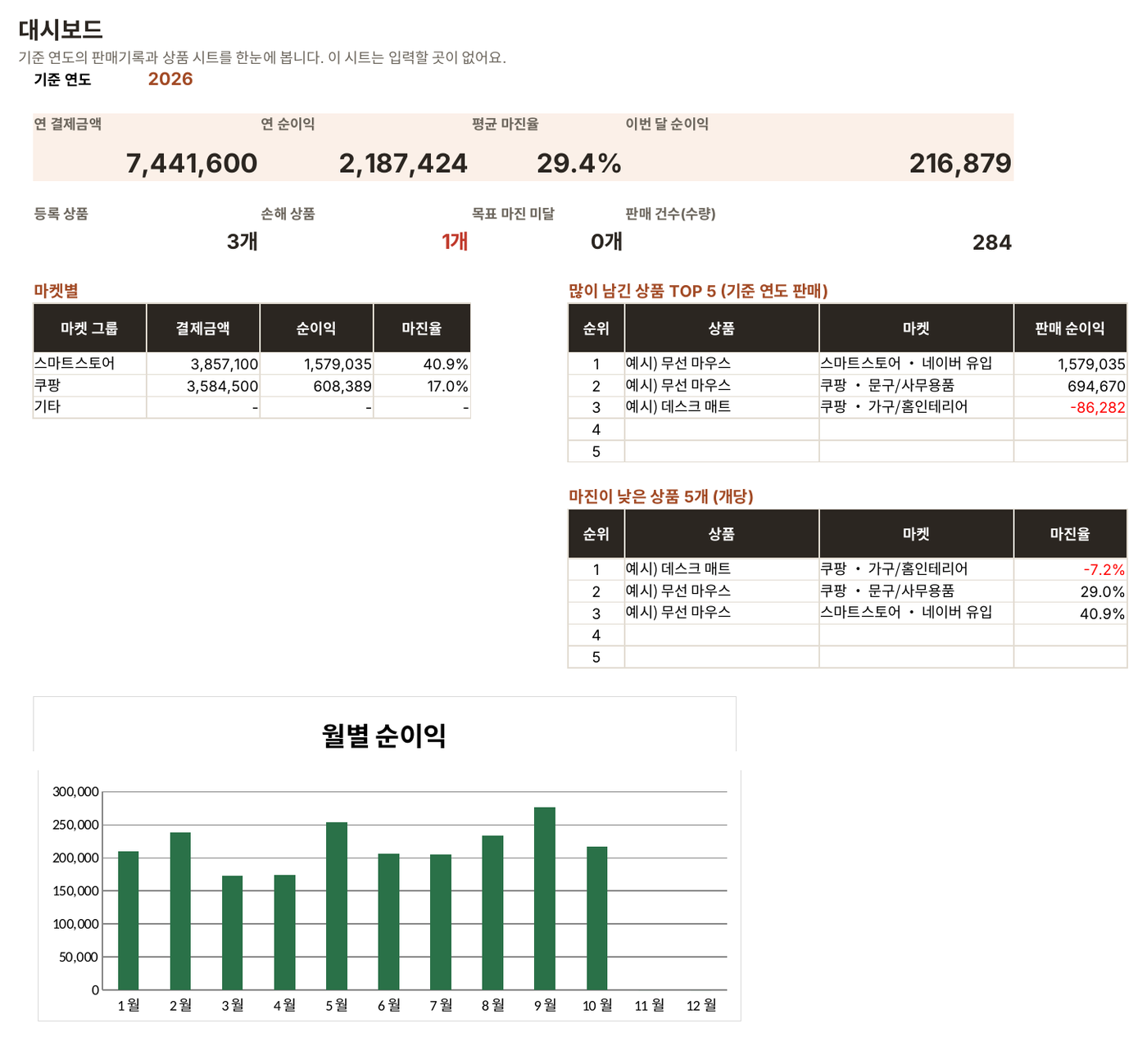
Dashboard: this year’s profit at a glance
Shows yearly payments, net profit, average margin and this month’s profit, plus how many products are losing money. It also breaks down profit by marketplace and lists your top earners and lowest-margin products.
Products: what price to charge
Enter the price, cost and shipping, and each product shows its net profit and margin, plus its break-even price, target-margin price, break-even ad ROAS and profit after a discount. Loss-making products and products below target are colour-coded.

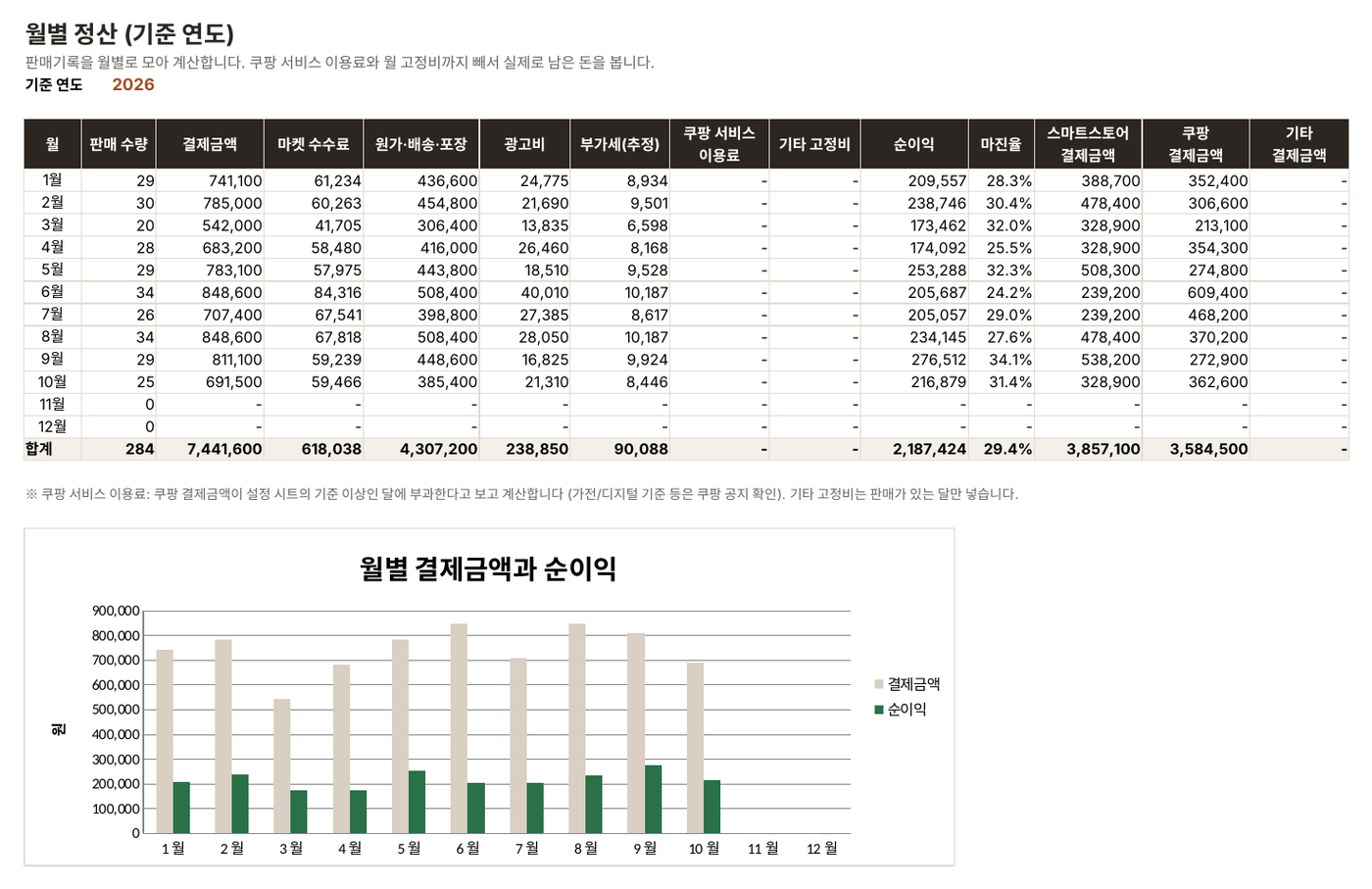
Sales log → monthly payouts
For each order, enter the date, product code and quantity. Fees, cost, ad spend, VAT and profit are calculated for you. The monthly sheet then also subtracts the Coupang seller service fee and your fixed monthly costs, so you see what you really kept.

VAT filing prep
See the estimated VAT for the first half (January–June), the second half (July–December) and the whole year, and whether you fall under the simplified-taxpayer exemption (under 48 million KRW a year) or the threshold for switching to general taxation (104 million KRW a year).
Overseas import cost
When buying from Taobao, 1688, Rakuten, Amazon and others, enter the local price in its currency, the weight and the box size. You get the cost per unit including the agent fee, international shipping on volumetric weight, the duty-free check, duty and import VAT.

FAQ
Which programs can open it?
We recommend Microsoft Excel 2016 or later (Windows or Mac). It also opens in Google Sheets, but charts and some formatting may look different.
What happens when fees change?
Edit the yellow cells on the settings sheet and every sheet updates. For one year after purchase we also send an updated file when rates change.
Does it match the calculators on this site?
Yes, it uses the same formulas. For example, a 29,900 KRW Smart Store product (Naver traffic, small-business rate) with a 12,000 KRW cost, 3,300 KRW courier fee and 500 KRW packing, for a simplified taxpayer, nets 12,241 KRW on both.
Can I use it to file my taxes?
It is for estimating amounts before you file. For the actual filing, follow Hometax data and a tax professional. Credits such as the card-sales tax credit are not included.
Can I get a refund?
Refunds follow the policy of the store where you paid. If the file does not open or something is wrong, email us.